| I have been preparing the questions for problem management process transition work for last few days. During the course of time i have come up with following questions which came to my mind, would be helpful for the people working on ITSM implementation projects. 1.What is the type of medium you use to raise a problem? |
| 2. What are the key factors you collect for a problem in ticket ? |
| 3.What is the process of notifying the users when there is a problem? |
| 4. do you have knowledge database for problems? |
| 5.do you take team meetings to discuss problems? |
| 6.Do you reject the tickets the tickets as problem ticket upon analyzing them? |
| 7.What are the main factors to define the ticket as a problem? |
| 8. What is the naming convention you use for problems? |
| 9. do you have root cause analysis process in place and a dedicated team for it? |
| 10. what is the general hierarchy for problem ticket ownership? |
| 11.Do you initiate change once root cause is identified for a problem? |
| 12.how do you notify people upon problem ticket progress or status? |
| 13. do you have root cause analysis templates available? |
| 14. what is the process of updating root cause analysis templates? |
| 15.Do you have SLA for problem management and for all their process statuses? |
| 16. do you have escalation process defined for problems? |
| 17.what is the process of closing the problem ticket? |
| 18.Do you update the knowledge base once
new solution is identified? |
Monday, 21 January 2013
Problem management process Transition Questionnaire ...!!!

Wednesday, 16 January 2013
Managed Services Approach:
Managed services
is the business model where customers IT Infrastructure is managed by
outsourced vendors, it’s a strategic methodology for improving the operations
mostly through production support and maintenance activities. Vendors who
provide these managed services are referred as service providers. Defined and
agreed service at predictable IT support costs can be achieved with this
business model. Below is the general architecture covering all the key points
in managed services model which represents my understanding about the managed
services process flow (not necessarily be industry standard).

Above figure depicts my view on the managed services model which covers all the key factors contributing to the success of the managed services business model. It starts with Client on-boarding from sales team through transition then understanding the client infrastructure to be managed and supported ,System readiness discovery and making the services run as expected and meeting the service levels with service desks,operations support and various service management process models. (Service management processes would be covered in coming blogs in depth .)
Benefits of managed services model
- IT Cost Predictability: it helps businesses to have clear idea upon their IT costs as it can have fixed price model based outsourcing .
- New technology: Service provider would be expert in their domain having access to newest of technologies and expert resources to use it .
- Improved customer service:Helps deploy self service capabilities help customers get helped themselves.
- Agreed SLAs: service provider have to work to manage their agreed SLAs hence accountability increases.
Monday, 14 January 2013
Questions to understand Incident Management Process
Many ITSM
analysts trying to understand their customers IT Infrastructure for ITIL
process methodology and analyzing their needs in order to bind them together with
standard processes usually ask multiple questions to their clients or customers
to grab that little extra information on processes, Here are some questions
that I may ask for understanding their Incident management process .
·
What
is the type of medium you use to log a ticket? Like email,chat,or phone
·
Do
you have greeting defined for upon receiving call?
·
Do
you have user/caller verification in process?
·
Do
you have verification process for new or temp users/caller?
·
How
do you find the details of the user on call logging tool? Is it auto populates
upon entering certain values or manual update?
·
What
are the categories available or should be used to categories the ticket?
·
What
are the criteria’s you have in place to determine whether its service request
or problem ticket or normal incident?
·
Do
you update the existing tickets? If yes what is the policy to update or
creation of new ticket even for the same issues?
·
What
is the ticket numbering policy?
·
Do
you have ticket dispatching policy or process for third party vendors?
·
Do
you have ticket escalation policy? What are the criteria?
·
How
do you convey the end user upon ticket closure?
·
What
is the procedure to be used for unresolved tickets for more than week?
·
What
is the procedure to be used if user calls for a status update on the ticket?
·
When
the ticket needs to be referred to SME?
·
What
is the call back process you have? What is the escalation procedure for L1 tickets?
·
What
is the ticket handling procedure for major incidents?
·
What
is the policy or procedure to get an update on third party vendor tickets and
update?
·
What
is the procedure for outbound calls?
·
What
is the process to update the knowledge management database upon identifying new
solutions?
Friday, 28 December 2012
Reporting Services Catalog Database File Existence Failed
While
installing the Microsoft SQL server 2008 enterprise evaluation edition I got an
error as
“Reporting
Services Catalog Database File Existence Failed or Temporary Database File
Existence failed” as follows

Tried to
google around to see if I get any solution on this and found the reason behind
the error , It was mainly because someone earlier had installed SQL server on this machine and
that was uninstalled couple of days ago which had left some of its footprints
on the machine through the reporting services files under program files
C:\Program
Files\Microsoft SQL Server\MSSQL10_50.SQLSERVER\MSSQL\DATA
This path
showed some files created for reporting services, hence deleted those files (you
need to have administrator privileges to delete them) and tried to Re-run the
setup it went through with no errors as follows

Hence it
worked for me the files deleted were found under C:\Program Files\Microsoft SQL
Server\MSSQL10_50.SQLSERVER\MSSQL\DATA. Though I forgot to note down the filenames which i deleted ,
other blogs on the same issue tell you the name of the files also ; ReportServer.mdf,ReportServer_log.LDF,ReportServerTempDB.mdf,ReportServerTempDB_log.LDF etc . But yes it was indeed a learning experience.
Wednesday, 19 December 2012
Installing OpenFiler
Openfiler is an Open Source Network Attached Storage and Storage
Area Network, Open filer supports volume based partitioning on native file
systems, Supports quota-based resource allocation and helps allocating shares
for various network file systems.
Below procedure helps Installing Open filer using graphical
Installation method on virtual machine
To begin installation attach the openfiler iso file to CD\DVD drive through virtual machine
settings

Click on connect at power on and boot the virtual machine It
displays

Hit Enter to go for graphical installation

Select language and keyboard whichever you want and next
comes disk partitioning, you can either select automatic partitioning or manual
partition and create partitions.
In network configuration step you would configure machine ip
address and other settings like hostname,gateway and dns etc.
Set the root password

Once you finish these steps click next and it starts the
installation process

Once you get installation complete screen you can click on
reboot to boo the machine and you will be presented with screen like this

To access the open filer through the web browser use
following
Management Interface: https://<ip of openfiler
host>:446
Administrator Username: openfiler
Administrator Password: password
Now you are ready to access your open filer through web
browser like this
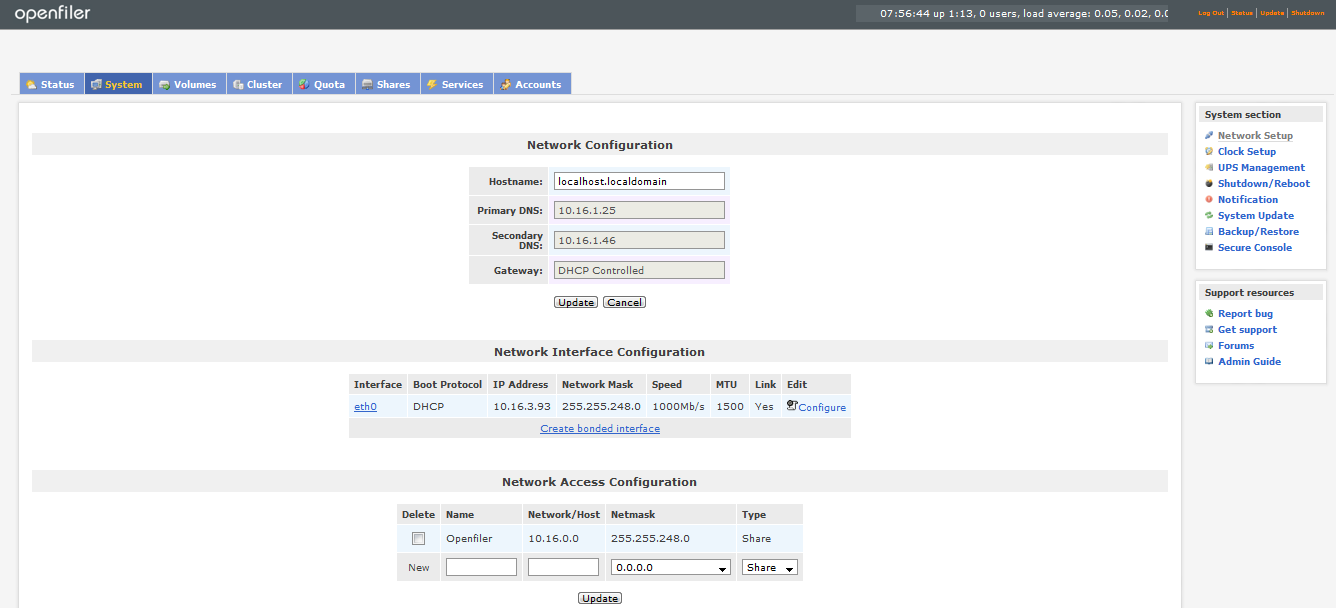
We will discuss using the Open Filer in coming blogs.
Friday, 7 December 2012
ADRMS Installation Facts
ADRMS (Active Directory Rights Management Server)
Active directory rights management services is a form of
service which helps in protecting corporate information through policies applied
over them selective operations could be authorized for selective users and the
access could be streamlined .companies use this technology to protect their
information which flows through emails, web services or shares .
Below is the general set up required to enforce this service

Set up key facts
1.
Login to Active directory and create domain
users (if active directory already exists)
2.
Install Microsoft server 2008 R2 on a new machine,
login as administrator and go to add roles and install active directory rights
management role
3.
You need service account to specify while
installing if this machine is not there on a domain then the service account
has to be a member of enterprise admin group
4.
If you want to use internal database then you
can select the same, if you want to use external database server then select
the same.
5.
Database server which is selected here should
have sql server browser services running and remote connections enabled.
6.
We need to select SSL security for server
authentication
7.
You can select the certificates issued by your
CA or self-signed certificates.
8.
Service connection point should be registered
while installing ADRMS.
9.
After installation you can create ADRMS
templates and path has to be specified on server.
10.
Change the registry settings at server as well
as at client where this set up need to be tested.
my next blog would cover detailed steps of ADRMS installation with screenshots.
Monday, 3 December 2012
vCenter Single Sign On Password Issues
If you are Unable to login to vSphere Web client and if it
says password is incorrect or account locked then you can check the status of
the account through various options
1.
You can use any other users logged in session with administrators privileges
2.
Wait for 15 minutes
3.
You can reset the same through command prompt
Procedure:
1.
Unlocking
administrator’s account using another session which is open is as follows
- Click on Home
- Go to Administration
- Select SSO Users and Groups
- Choose the administrators account right click and click Unlock
2.
Wait
for 15 minutes
You can wait for 15 minutes as because
by default account lockout policy is set to unlock after 15 minutes this should
work fine in most of the cases.
3. Resetting Administrators
password through command prompt
If SSO server is installed on Windows server
then you can reset the password through command prompt also
- Login to SSO server as admin
- Go to command prompt Start > Run, type cmd, and click OK
- Navigate to SSOInstallDirectory through default installation directory i.e.
- C:\Program Files\VMware\Infrastructure\SSOServer.
- Run the command : rsautil reset-admin-password
- Provide the master password which was given during SSO installation it should accept even if it is changed
- Enter the name of the administrator account which needs password reset
- Type the new password and confirm it again
·
This should fix the issue
Subscribe to:
Posts (Atom)